
XF 1600 IFU 5.0 en.pdf
Vista previa de texto
Chapter 9
9.10.3
Cytometer QC and setup
Displaying QC reports
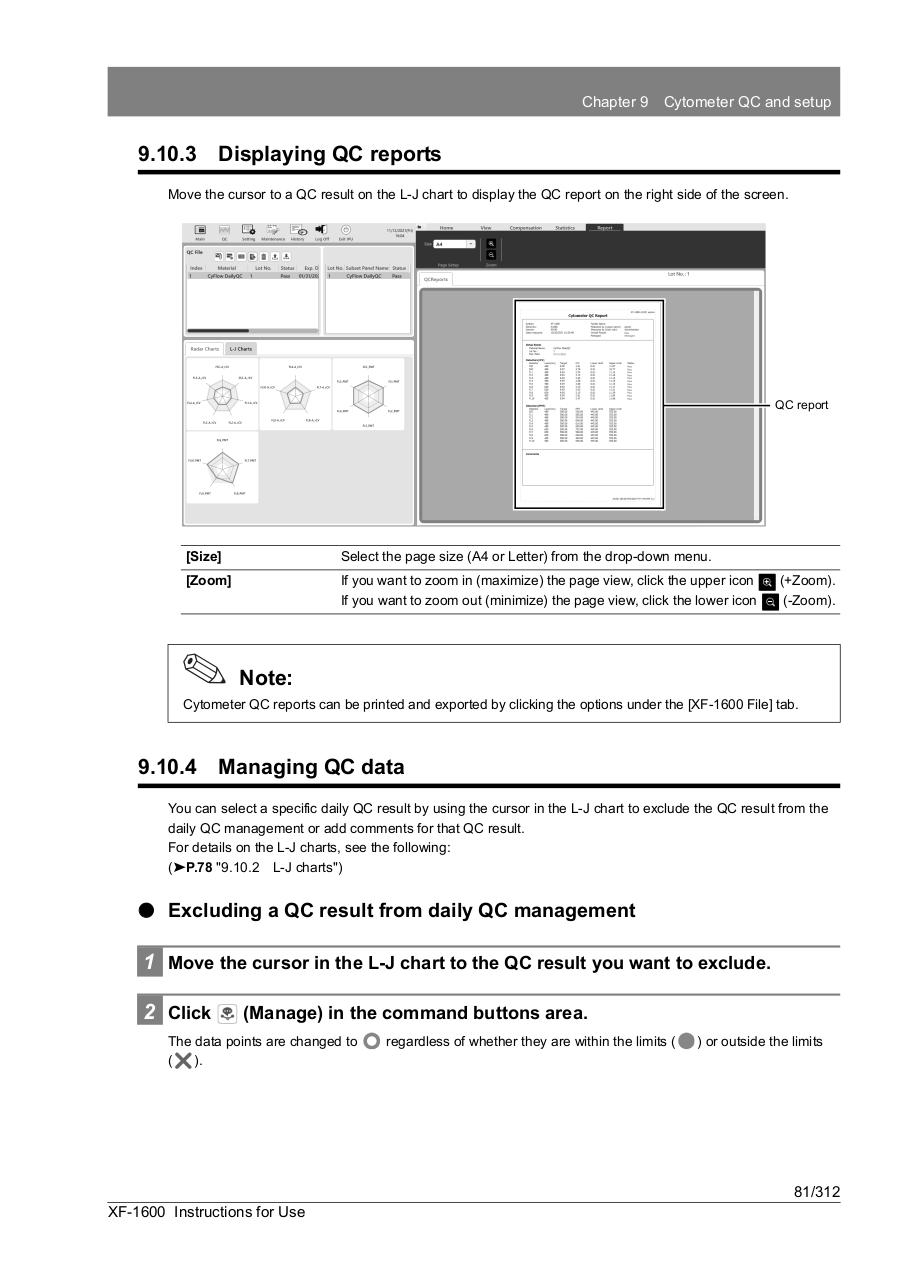
Move the cursor to a QC result on the L-J chart to display the QC report on the right side of the screen.
QC report
[Size]
Select the page size (A4 or Letter) from the drop-down menu.
[Zoom]
If you want to zoom in (maximize) the page view, click the upper icon
If you want to zoom out (minimize) the page view, click the lower icon
(+Zoom).
(-Zoom).
Note:
Cytometer QC reports can be printed and exported by clicking the options under the [XF-1600 File] tab.
9.10.4
Managing QC data
You can select a specific daily QC result by using the cursor in the L-J chart to exclude the QC result from the
daily QC management or add comments for that QC result.
For details on the L-J charts, see the following:
(➤P.78 "9.10.2 L-J charts")
⏺ Excluding a QC result from daily QC management
1 Move the cursor in the L-J chart to the QC result you want to exclude.
2 Click
(Manage) in the command buttons area.
The data points are changed to
(
).
regardless of whether they are within the limits (
) or outside the limits
81/312
XF-1600 Instructions for Use