
XF 1600 IFU 5.0 en.pdf
Vista previa de texto
Chapter 9
9.7
Cytometer QC and setup
Registering lot information
When you use a new bead lot, create a QC file for the lot before proceeding to baseline setup and daily QC.
The lot information can be registered using either of the following two methods:
• Scanning the barcodes on the assay sheet for the lot
• Entering the information manually
1 Click
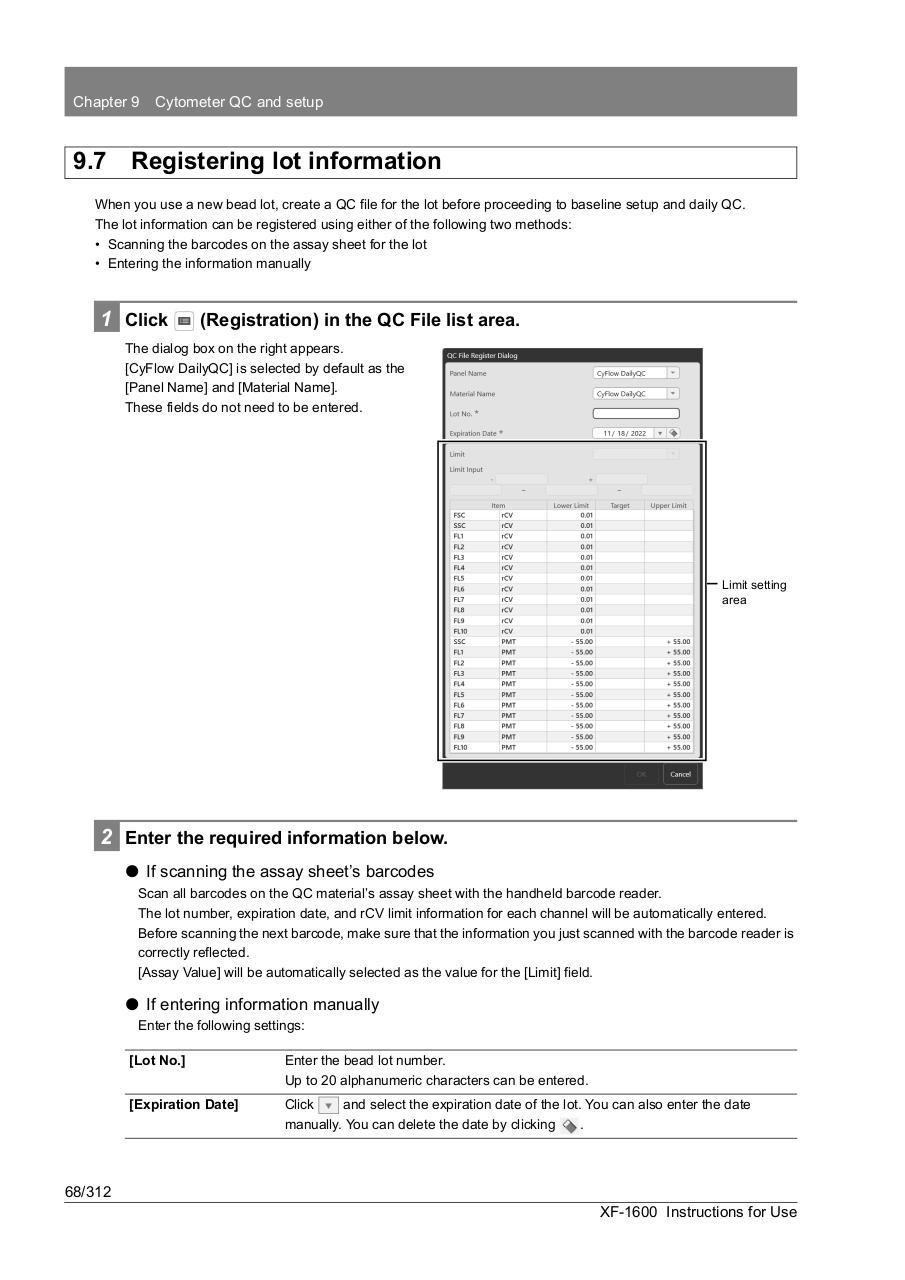
(Registration) in the QC File list area.
The dialog box on the right appears.
[CyFlow DailyQC] is selected by default as the
[Panel Name] and [Material Name].
These fields do not need to be entered.
Limit setting
area
2 Enter the required information below.
⏺ If scanning the assay sheet’s barcodes
Scan all barcodes on the QC material’s assay sheet with the handheld barcode reader.
The lot number, expiration date, and rCV limit information for each channel will be automatically entered.
Before scanning the next barcode, make sure that the information you just scanned with the barcode reader is
correctly reflected.
[Assay Value] will be automatically selected as the value for the [Limit] field.
⏺ If entering information manually
Enter the following settings:
[Lot No.]
Enter the bead lot number.
Up to 20 alphanumeric characters can be entered.
[Expiration Date]
Click
and select the expiration date of the lot. You can also enter the date
manually. You can delete the date by clicking
.
68/312
XF-1600 Instructions for Use