
ConexionPitLaneND108aPC en v1.1.pdf
Vista previa de texto
7) Configure your COM port to:
Bits per Second: 1200
Data Bits: 7
Parity: None
Stop Bits: 1
Flux Control: None
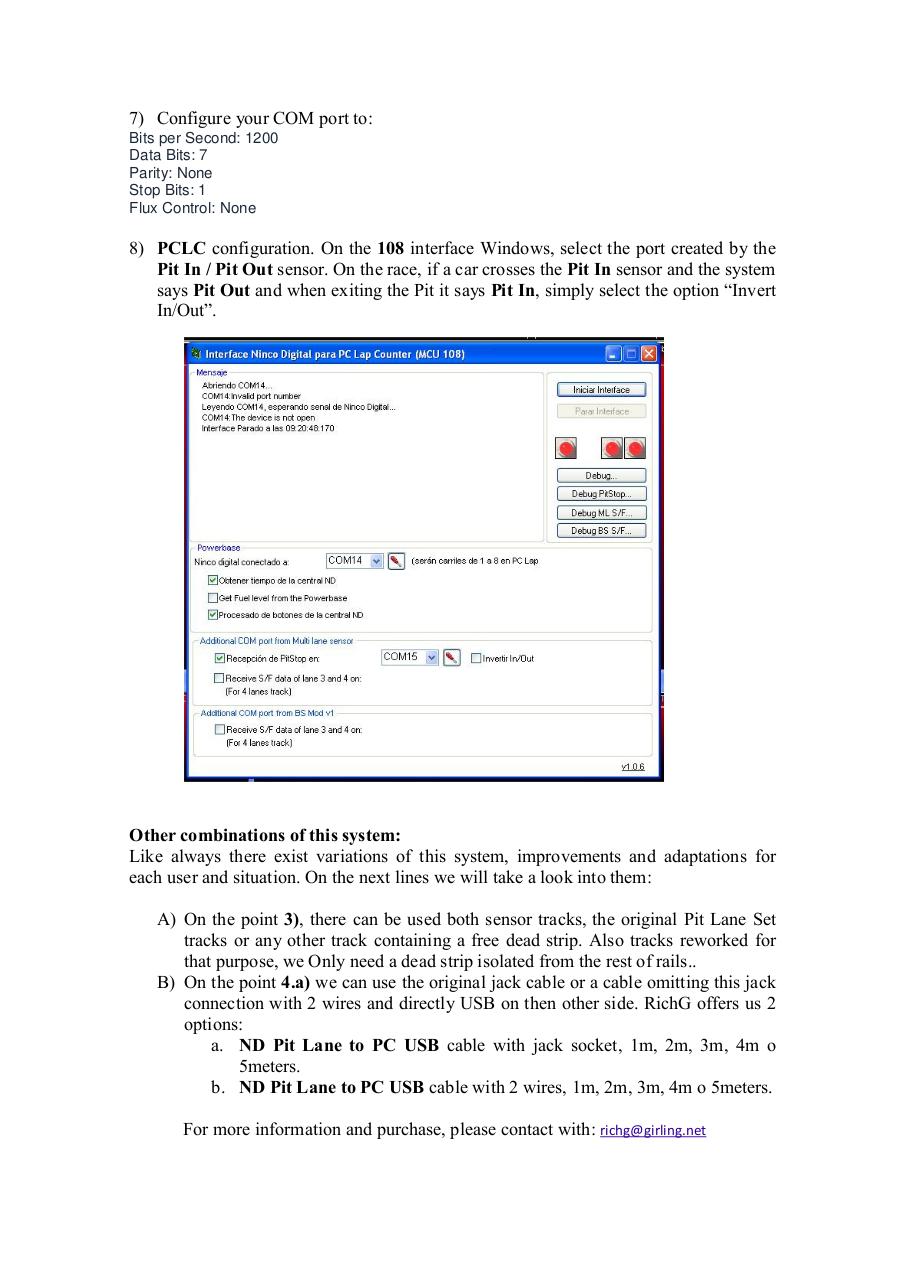
8) PCLC configuration. On the 108 interface Windows, select the port created by the
Pit In / Pit Out sensor. On the race, if a car crosses the Pit In sensor and the system
says Pit Out and when exiting the Pit it says Pit In, simply select the option “Invert
In/Out”.
Other combinations of this system:
Like always there exist variations of this system, improvements and adaptations for
each user and situation. On the next lines we will take a look into them:
A) On the point 3), there can be used both sensor tracks, the original Pit Lane Set
tracks or any other track containing a free dead strip. Also tracks reworked for
that purpose, we Only need a dead strip isolated from the rest of rails..
B) On the point 4.a) we can use the original jack cable or a cable omitting this jack
connection with 2 wires and directly USB on then other side. RichG offers us 2
options:
a. ND Pit Lane to PC USB cable with jack socket, 1m, 2m, 3m, 4m o
5meters.
b. ND Pit Lane to PC USB cable with 2 wires, 1m, 2m, 3m, 4m o 5meters.
For more information and purchase, please contact with: richg@girling.net