
XF 1600 IFU 5.0 en.pdf
Vista previa de texto
Chapter 8
8.6
Basic operation
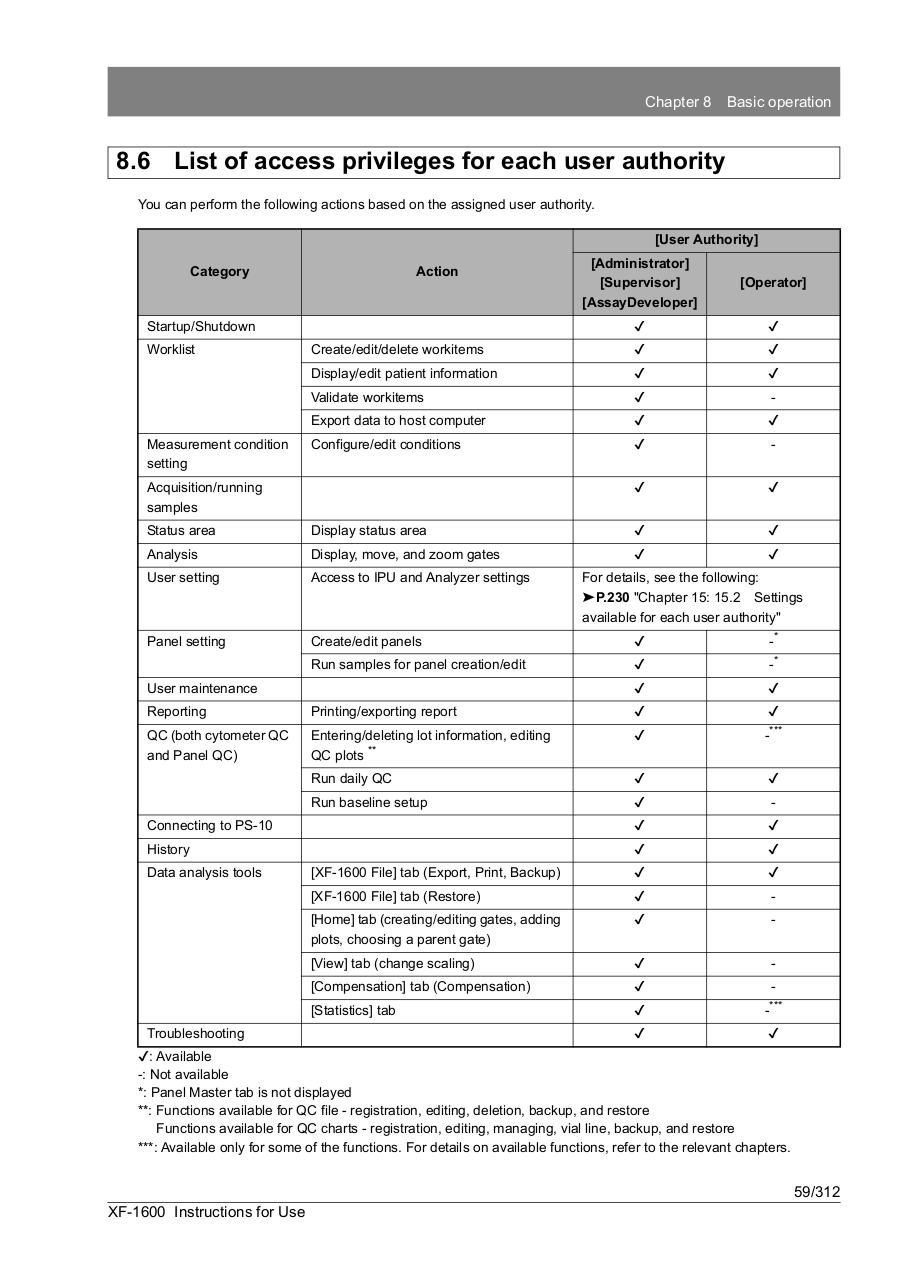
List of access privileges for each user authority
You can perform the following actions based on the assigned user authority.
[User Authority]
[Administrator]
[Supervisor]
[AssayDeveloper]
[Operator]
✔
✔
Create/edit/delete workitems
✔
✔
Display/edit patient information
✔
✔
Category
Action
Startup/Shutdown
Worklist
Measurement condition
setting
Validate workitems
✔
-
Export data to host computer
✔
✔
Configure/edit conditions
✔
-
✔
✔
Acquisition/running
samples
Status area
Display status area
✔
✔
Analysis
Display, move, and zoom gates
✔
✔
User setting
Access to IPU and Analyzer settings
Panel setting
Create/edit panels
✔
-*
Run samples for panel creation/edit
✔
-*
✔
✔
User maintenance
For details, see the following:
➤P.230 "Chapter 15: 15.2 Settings
available for each user authority"
Reporting
Printing/exporting report
✔
✔
QC (both cytometer QC
and Panel QC)
Entering/deleting lot information, editing
QC plots **
✔
-***
Run daily QC
✔
✔
Run baseline setup
✔
-
Connecting to PS-10
✔
✔
History
✔
✔
[XF-1600 File] tab (Export, Print, Backup)
✔
✔
[XF-1600 File] tab (Restore)
✔
-
[Home] tab (creating/editing gates, adding
plots, choosing a parent gate)
✔
-
[View] tab (change scaling)
✔
-
[Compensation] tab (Compensation)
✔
-
[Statistics] tab
✔
-***
✔
✔
Data analysis tools
Troubleshooting
✔: Available
-: Not available
*: Panel Master tab is not displayed
**: Functions available for QC file - registration, editing, deletion, backup, and restore
Functions available for QC charts - registration, editing, managing, vial line, backup, and restore
***: Available only for some of the functions. For details on available functions, refer to the relevant chapters.
59/312
XF-1600 Instructions for Use